Fast isa feature.

Request Eagle is a Postman alternative written in Rust and rendered on the GPU. It is a real desktop app for macOS, Windows and Linux with no web view inside, and it keeps your requests as files on your disk.

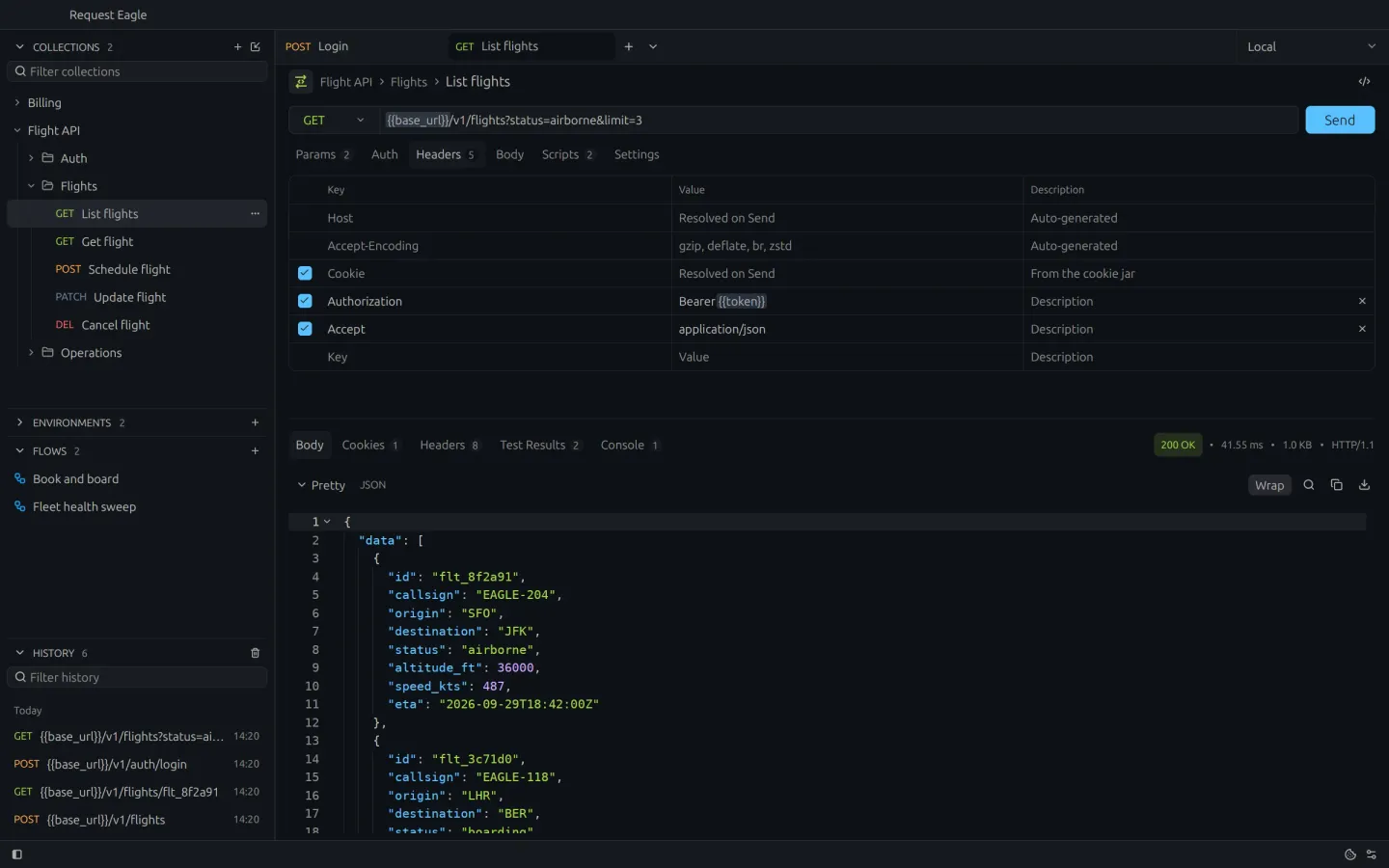
Request Eagle showing collections, flows and request history in the sidebar, a GET request and a formatted JSON response with a 200 OK status.
No web view.No account.No cloud.

Ready in
0.36 seconds.

That is the time from launch until it answers your first keystroke. Postman takes 4.3 seconds, 12 times as long.

Request Eagle answers a keystroke 0.36 seconds after launch. Postman answers after 4.33 seconds.

How this was measured

Both apps were launched five times in turn on a MacBook Pro with an M5 Pro while the screen was recorded at 60 frames per second. From the launch, a shortcut was pressed every 50 ms: Cmd+K, which opens Request Eagle's command palette, and Cmd+comma, which opens Postman's settings. The time runs from the launch to the first frame showing the app's answer. The figures are medians: 359 ms for Request Eagle 0.1.28, and 4,331 ms for Postman 12.31.3 signed in to an account.

Your disk.
Your git.

Every request is a TOML file in a folder you control. There is no account and no export step. Commit, pull, push and sync from the Git panel, with the git you already use.

  • Keep a collection inside your project's repository
  • Changes, branch and remote at a glance
  • Collections, folders and variables as plain files
# Flight API / Flights / List flights.toml
id = "3f1c9a52-7e4b-4d1a-9c55-0b6e2a8d41f7"
name = "List flights"
schema_version = 1

[request]
type = "http"
method = "GET"
path = "{{base_url}}/v1/flights"
headers = [["Authorization", "Bearer {{token}}"]]
query = [["status", "airborne"], ["limit", "25"]]
Git panel with a commit message, Commit and Sync buttons, one commit to pull and two changed requests.

Script it.
Test it.

Pre-request and post-response JavaScript with a familiar pm.* API. Results land next to the response.

  • Chained requests with await pm.sendRequest
  • Assertions and JSON Schema checks
  • SHA-256, HMAC and Base64 helpers
  • Typed completion, no Node.js needed
Script editor with a pre-request script and two passing tests in the response panel.

Never leave
the keys.

Send with ⌘↵ from anywhere in the request. Rebind any shortcut, and switch on Vim mode for the body and script editors.

  • Vim motions, operators, counts and Visual mode
  • Variable completion when you type {{
  • Generated values such as {{$guid}}
JSON body editor in Vim Normal mode.
Variable completion menu listing environment and generated variables.

Ask your
agent.

Claude Code, Codex or OpenCode in a panel next to your requests. Point at what you mean and ask: the agent reads the code behind your API and fixes or creates saved requests.

  • Cite a selection with ⌘L, mention a saved request with @
  • The exact model, reasoning level and mode
  • Your agent's own sign-in, models and tools
Agent panel with a cited response, the agent's commands and its explanation of the fix it made to the saved request.
Message box listing saved requests and the collection to mention after typing @.

Agents
welcome.

The same collections work for any agent, in the panel or in your terminal. An optional CLI speaks JSON, describes its own schema and runs without the app.

$ request-eagle-cli schema

$ request-eagle-cli call \
    '{"command":"requests.list","query":"health"}'

$ request-eagle-cli call \
    '{"command":"requests.run",
      "path":"/absolute/path/Health.toml",
      "timeout_ms":10000}'

Make it
yours.

Eleven theme families, each in light and dark. Pick your editor font and scale the whole interface from 12 to 24 px.

Request Eagle in the Ayu Dark theme.

Ready
for takeoff.

Request Eagle runs on Apple Silicon Macs, Windows and Linux. It is in early development.